Trym HåkanssonSwitch to Labs

MICROSOFT SECURITY NEWSFEED

Microsoft security news, filtered for what matters.

An automated newsfeed that collects updates from 43 Microsoft security, identity, endpoint and AI sources every six hours. It ranks the most relevant stories and links straight to the original publishers.

SEARCH AND FILTER

Search the Microsoft security newsfeed.

TOP STORY

Highest-ranked recent article

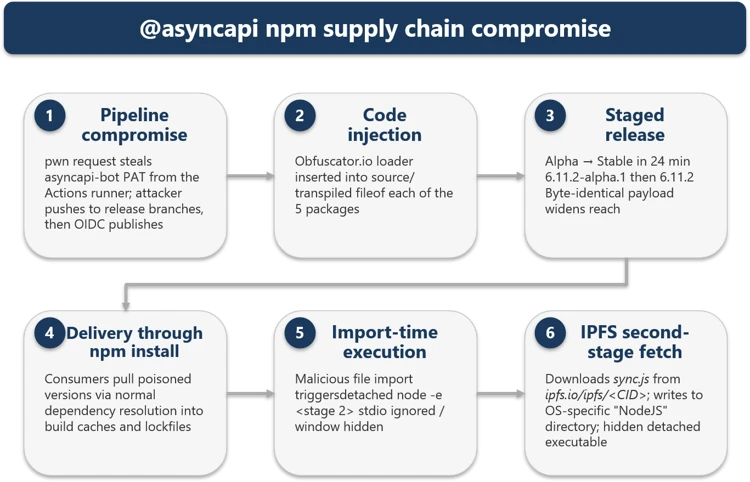
Unpacking the AsyncAPI npm supply chain compromise and import-time payload delivery

On July 14, Microsoft Threat Intelligence uncovered a coordinated supply-chain compromise of the @asyncapi organization on npm, with five package versions republished using the same malicious loader. Because @asyncapi/specs is a transitive dependency and the code runs at import time rather than through postinstall, affected developer machines, CI/CD pipelines, and production services are not protected by “npm install --ignore-scripts.”

86 relevance scoreRead the source
LATEST NEWS

Latest Microsoft security news.

Showing 48 recent items.

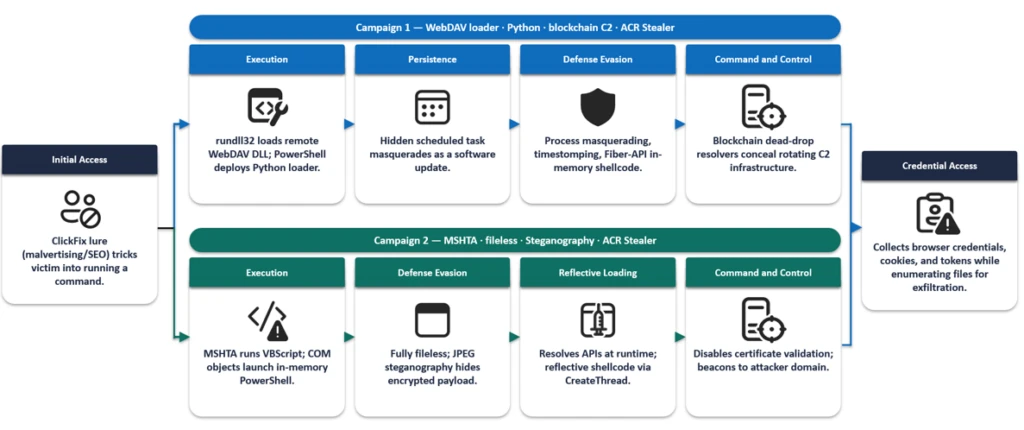
  1. ACR Stealer: Two observed intrusion chains amid increased threat activity

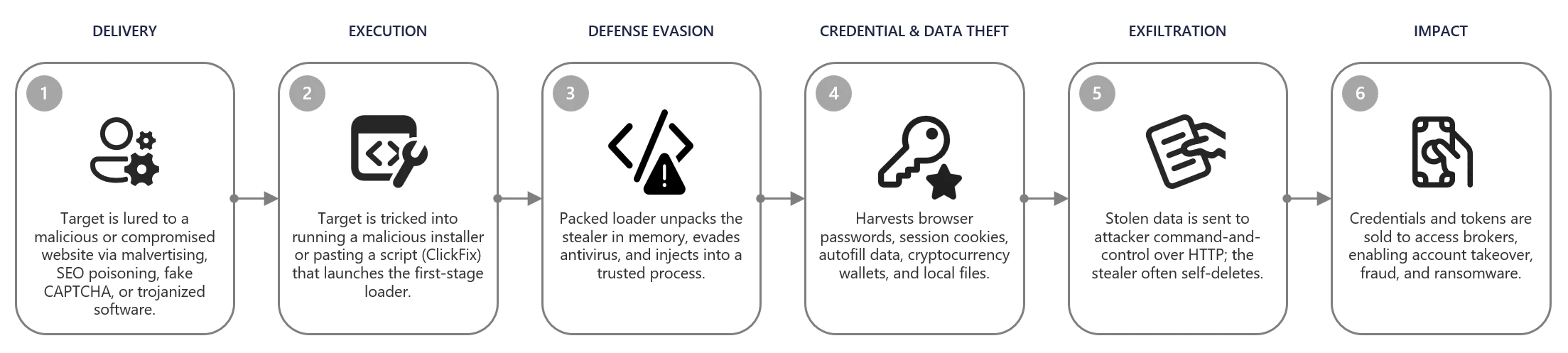
    Microsoft Defender Experts has observed increased ACR Stealer activity using ClickFix lures to trick employees into running malicious commands that steal browser passwords, session tokens, and sensitive documents, potentially enabling access to cloud resources and further intrusion. IT teams should monitor for ClickFix lures, suspicious WebDAV activity, and obfuscated PowerShell execution.

    78/100
  2. Least privilege for AI agents: Identity, access, and tool binding

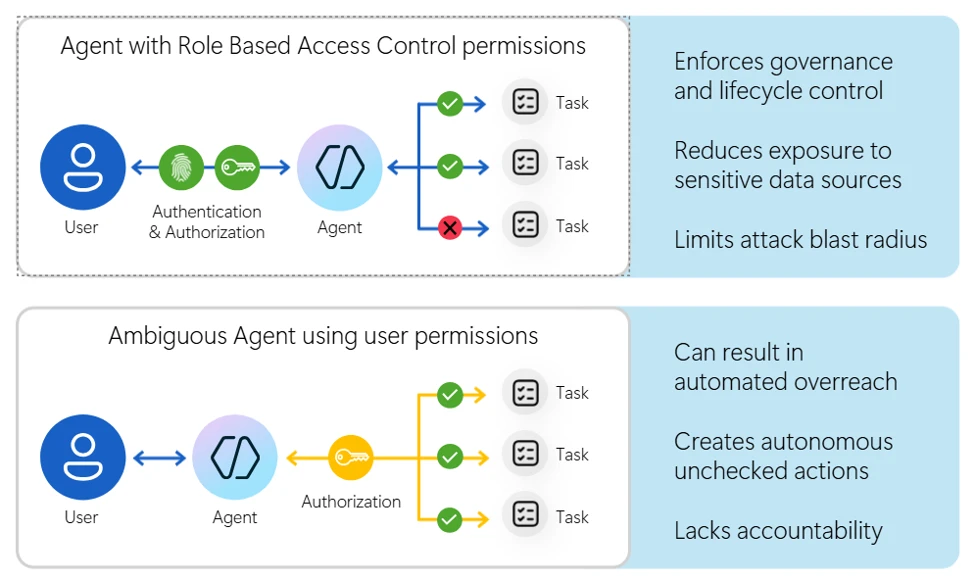
    AI agents plan and chain actions across systems without human approval at every step, so overly broad role assignments can grant access far beyond what was intended. Microsoft recommends treating each agent as a separate identity with a dedicated managed identity, least-privilege RBAC, a clearly defined scope, and secure tool binding before broad deployment.

    55/100
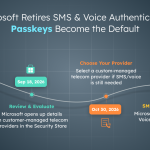
  3. Microsoft to Stop Providing Telephony-Based Authentication Methods for MFA in February 2027

    Microsoft says in MC1426371 that it will stop providing SMS one-time codes and voice calls for MFA on February 1, 2027, and move all tenants toward passkeys as a second factor. Customers that still require SMS or voice must purchase the service from a telecommunications provider through Microsoft Security Store starting September 18, 2026, so administrators should begin deploying passkeys now to prevent users from losing their sign-in method.

    60/100
  4. Defending SaaS-based applications against ShinyHunters OAuth abuse

    Microsoft tracked campaigns from 2025 to 2026 in which actors linked to ShinyHunters abused trusted OAuth connections, vishing, and misconfigured guest access to reach SaaS applications such as Salesforce. A single entry point can quickly lead to large-scale CRM data extraction while bypassing standard sign-in alerts, so administrators should monitor OAuth-connected apps, review consent grants, and tighten guest access.

    74/100
  5. GigaWiper: Anatomy of a destructive backdoor assembled from multiple malware

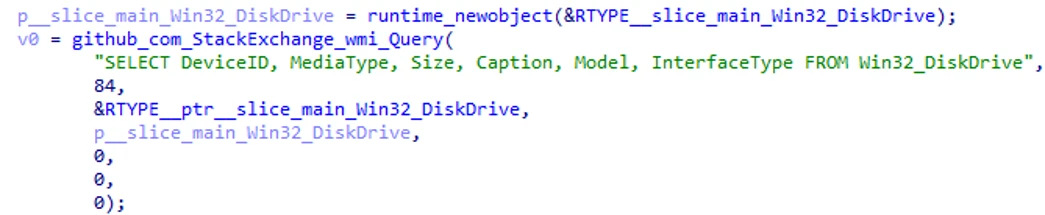
    Microsoft Threat Intelligence has analyzed GigaWiper, a Golang-based backdoor that combines several destructive malware families in one implant, from physical disk wiping to fake ransomware whose encryption keys are never stored. Threat actors select the destruction method through on-demand commands, making attacks more flexible and difficult to predict, and security teams should review the Defender detections and indicators of compromise in the report.

    79/100
  6. Announcing new builds for July 6 2026

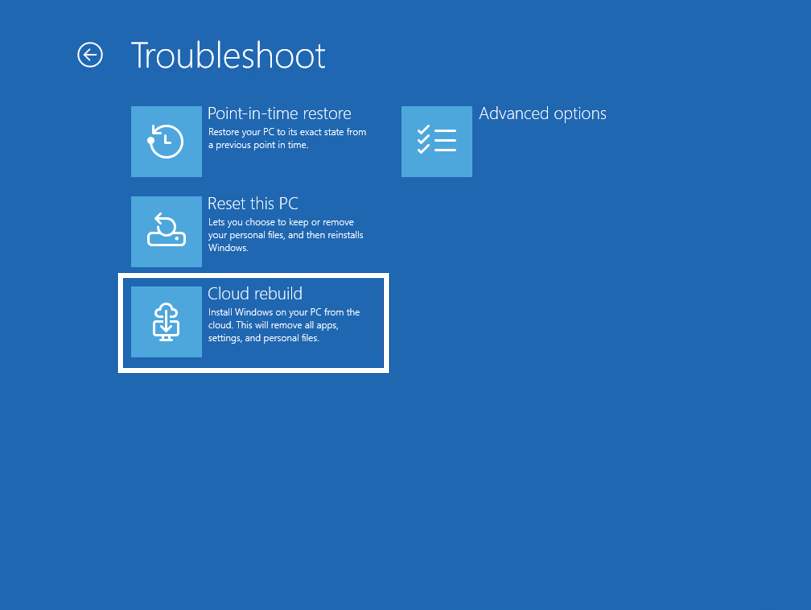
    Microsoft is testing Cloud Rebuild in the Experimental Channel, a recovery feature that completely reinstalls Windows 11 by downloading both the OS image and device drivers from Windows Update, even when Windows cannot start. Unlike Reset this PC, it requires neither USB media nor a separate image, simplifying recovery of locked or damaged endpoints.

    52/100
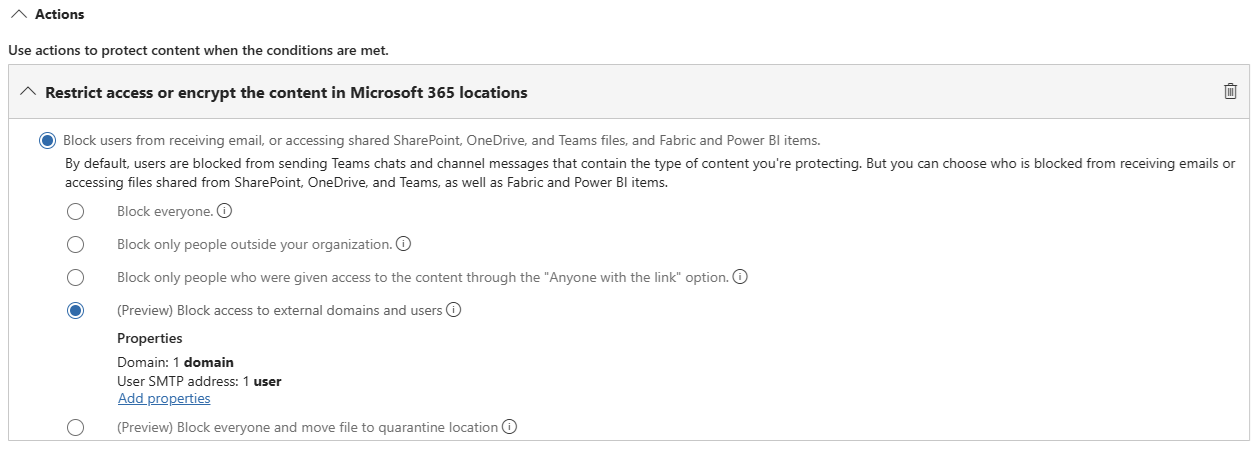
  7. Purview Data Loss Prevention Introduces File Quarantine

    Purview DLP is adding a “move to quarantine” action that isolates files violating DLP policies in a secure SharePoint location instead of merely blocking them, replacing the original with a tombstone text file that explains what happened and why. The feature is currently in preview and is scheduled for general availability in early June 2026 (MC1288527).

    53/100
  8. ​​What’s new in Microsoft Security: June 2026

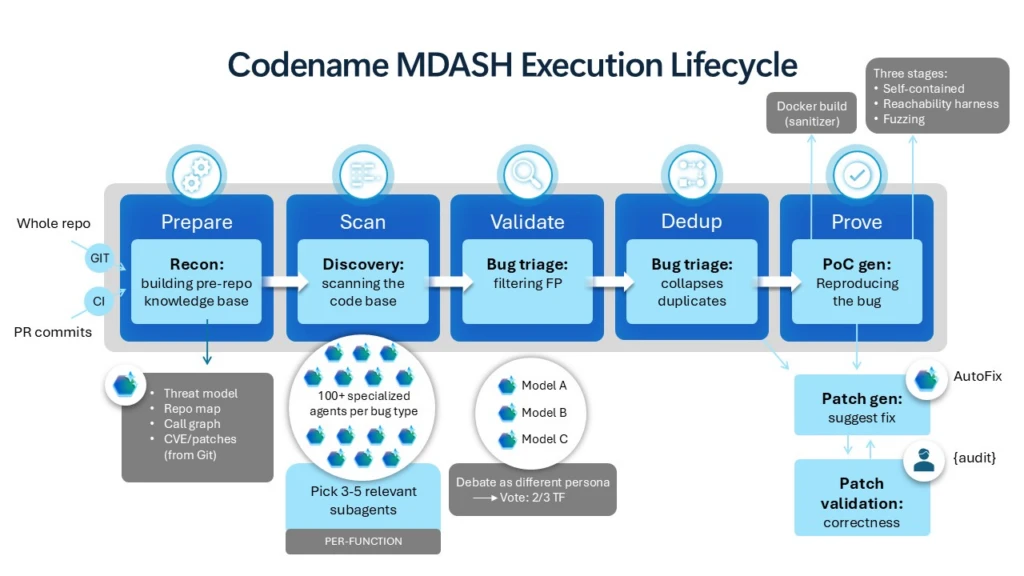
    Microsoft’s monthly security update introduces “MDASH” in private preview, an agent-based AI system that scans complex code to find and validate vulnerabilities and route them directly into Defender workflows, while Defender is also extending endpoint protection to local AI agents. These developments give IT admins new vulnerability tools but also reflect a growing attack surface as AI agents are adopted.

    52/100
  9. Securing AI agents: When AI tools move from reading to acting

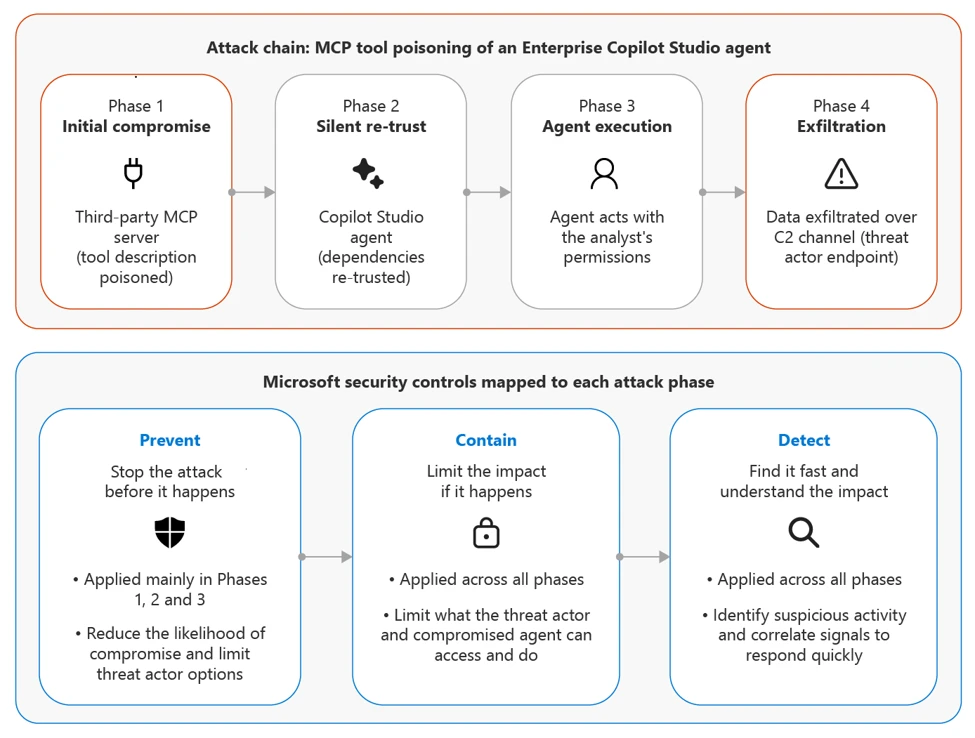
    Microsoft Incident Response describes an attack pattern in which malicious Model Context Protocol (MCP) tools manipulate AI agents that can not only read content but also perform actions such as sending email or changing systems, and provides a practical playbook for detecting, containing, and preventing these attacks with Microsoft security controls. As agents in Microsoft 365 Copilot, Copilot Studio, and Azure AI Foundry gain write access, the attack surface grows and IT admins need to understand the risk.

    64/100
  10. Chromium extension uses AI‑related branding to redirect browser search

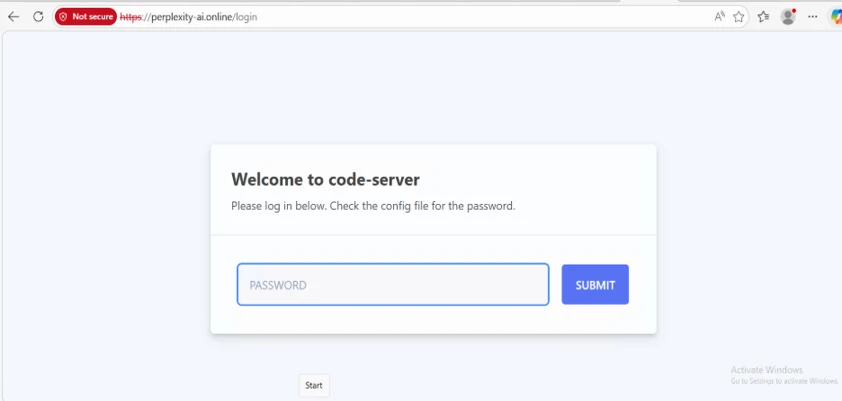
    Microsoft Threat Intelligence uncovered a Chromium extension impersonating Perplexity AI that secretly redirects address-bar searches using Manifest V3 and declarativeNetRequest rules to capture search traffic and collect data for profiling or advertising. Google removed it after notification, but organizations should consider allowlisting browser extensions because they remain an underestimated attack surface.

    55/100
  11. Photo ZIP campaign targeting hospitality industry delivers Node.js implant for persistent access

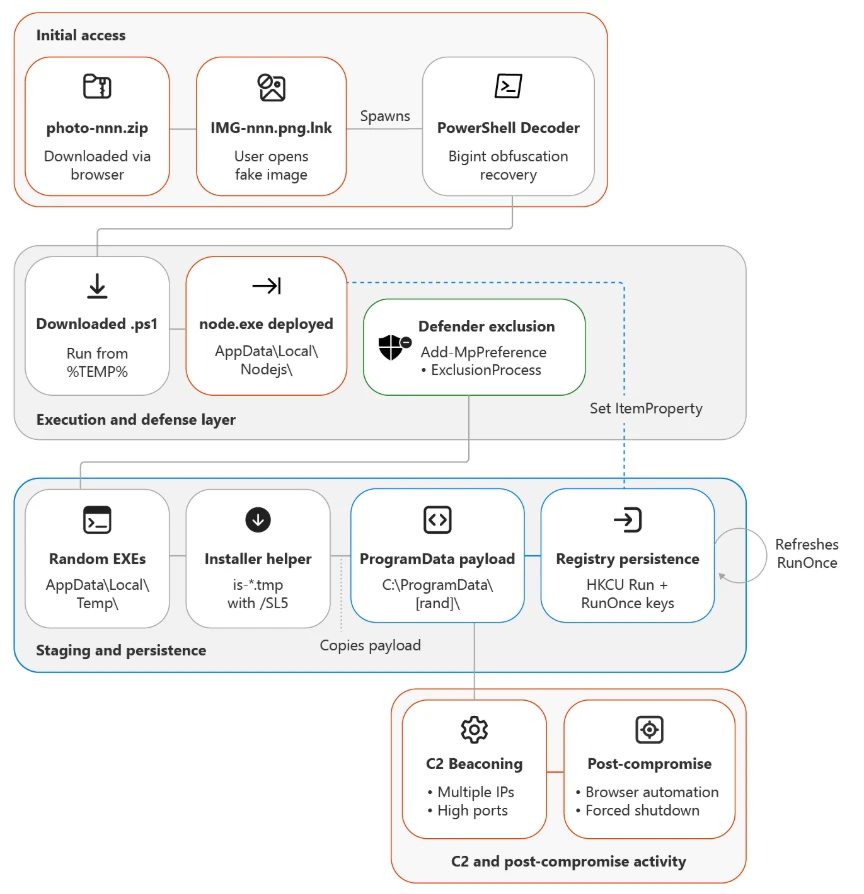
    Since April 2026, Microsoft Threat Intelligence has tracked an ongoing multistage campaign targeting hospitality and travel organizations in Europe and Asia, using image ZIP files with fake shortcuts to launch obfuscated PowerShell, install a Node.js implant, and establish dual registry persistence with command-and-control traffic over unusual ports. The attackers use legitimate services such as Calendly and Google's URL redirection for phishing with multilingual lures, and industry administrators should hunt for these persistence mechanisms.

    75/100
  12. StealC and Amadey: Breaking down infostealers and the cybercrime services that deliver them

    Microsoft Security analyzes the StealC infostealer family and the Amadey delivery service, which are rented as commodities in the cybercrime ecosystem; infections on employees' personal devices can steal VPN passwords, SSO tokens, and session cookies that let attackers bypass MFA and enter corporate networks. Microsoft Defender has new detections and indicators of compromise, and administrators should strengthen identity protection, credential hygiene, and rapid response to compromised accounts.

    64/100
  13. Why identity is the Copilot unlock

    Microsoft FastTrack argues that stalled Copilot deployments are rarely a licensing or Copilot problem, but an identity problem because Microsoft 365 Copilot authenticates through Entra ID and inherits each user’s Graph access. Part two targets Microsoft 365 administrators and CIOs whose immature identity foundations have prevented users from accessing Copilot and left them without a control plane for future agents.

    38/100
  14. Block High-risk Agents Using Identity Protection

    AdminDroid shows how to detect high-risk AI agents in Entra and block their access in real time using Identity Protection risk signals. Because a compromised or manipulated agent, including one affected by prompt injection, can operate autonomously across Microsoft 365 until detected, live risk-based Conditional Access is a better option than blocking all agents.

    31/100
  15. Cross-Tenant Message Recall and Duplicate DDG Detection Enhance Exchange Online Messaging

    Exchange Online is gaining two features: a check that prevents duplicate dynamic distribution groups and cross-tenant message recall. Administrators must explicitly choose which external tenants may recall messages delivered to their organization and should assess the governance implications before enabling the feature.

    45/100
  16. Passkeys by default and retirement of Microsoft-provided SMS and voice authentication – A guide to stay calm

    Jan Bakker provides a practical timeline for the retirement of Microsoft-provided SMS and voice MFA and the shift to passkeys by default. The first milestone is September 1, 2026, when all SMS and voice users will be automatically enabled and prompted to register a passkey at sign-in, so administrators should ensure everyone has a phishing-resistant method before the summer holidays reduce preparation time.

    43/100
  17. Passkeys Become the Default as Microsoft Entra Retires SMS and Voice Authentication

    AdminDroid summarizes Microsoft’s transition to a passkey-first Entra ID model and explains why phone-based MFA poses a growing risk as organizations increase their use of AI. SMS and voice codes travel over telephone networks and are vulnerable to interception, social engineering, and SIM swapping, making the article useful background for prioritizing passkey deployment.

    32/100
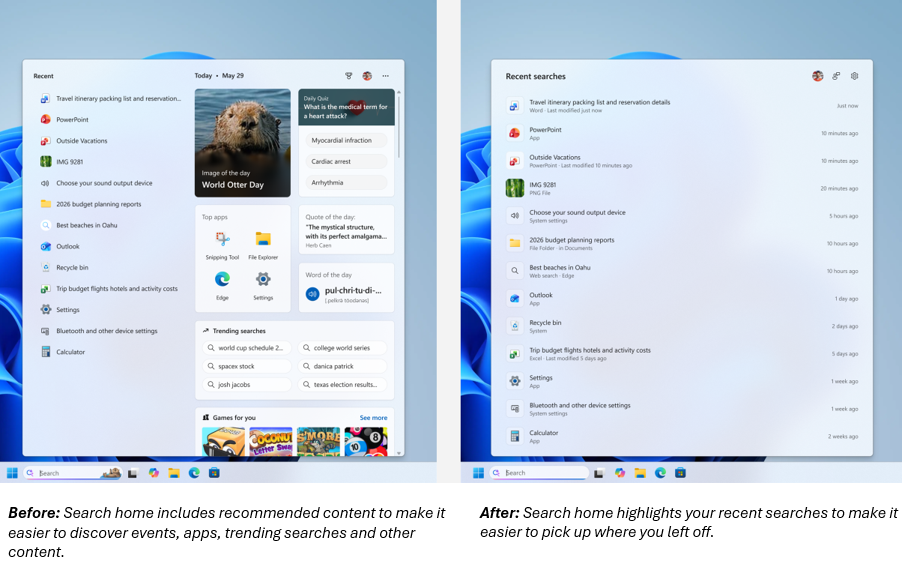
  18. Improving Windows Search Box, with less clutter and more control

    Microsoft is rolling out Windows search box improvements to Insiders in the Experimental Channel, including a cleaner home screen, clearer labels showing whether results come from apps, settings, files, or the web, and no advertising in web results. A new Privacy & security setting controls whether web and Microsoft Store suggestions appear, and endpoint administrators should watch how these controls eventually reach managed Windows clients.

    38/100
  19. How to Identify Obsolete SharePoint Online Sites with PowerShell

    Tony Redmond demonstrates how to use PowerShell to identify obsolete SharePoint Online sites in large tenants, warning that background processes make LastModifiedDateTime unreliable and prone to false positives. Administrators cleaning up thousands of sites must combine multiple activity sources to determine which sites are truly inactive.

    36/100
  20. The Intune MDM Device Certificate KSP Renewal Bug: Why the Bit4id Provider Caused it

    Rudy Ooms investigates why Intune MDM device certificates stopped renewing on some Windows 11 23H2 machines and identifies Bit4id’s Key Storage Provider as the cause. Because an unrenewed certificate can eventually cause the device to lose trust and break MDM communication, Intune administrators should check which KSP affected certificates use to prevent devices from silently dropping out.

    43/100
  21. Manage Federated Group Chats with Teams PowerShell Controls

    Microsoft has added two tenant parameters to the Set-CsTenantFederationConfiguration PowerShell cmdlet to enforce external-access rules throughout the lifecycle of federated Teams group chats. Administrators should enable the controls so updated policies apply to existing chats, preventing external users from retaining access or being added through a third-party tenant when policy no longer permits it.

    36/100
  22. Windows 365 Frontline was renamed to Windows 365 Flex

    Microsoft has renamed Windows 365 Frontline to Windows 365 Flex, with the rebranding now rolling out across Intune, including changing the device model value from “CloudPC Frontline” to “Windows 365 Flex.” Admins should update assignment filters, dynamic Entra group rules, and device category scripts to prevent devices from dropping out of policies.

    43/100
  23. Make Your Test Data Less Boring with M365Mutator

    Tony Redmond has created M365Mutator, a local open-source tool that connects to a tenant through Microsoft Graph and generates realistic Entra ID user changes, email, calendar entries, and OneDrive and SharePoint file operations. It is useful for demos, backup testing, and Graph development when static CDX tenants provide stale, uninteresting data.

    36/100
  24. Hands-On Microsoft 365 Pulse – Weekly Updates (Week 27)

    This week’s HANDS ON tek Pulse covers three SharePoint updates: SharePoint links in Teams now open in the SharePoint app, a new button web part arriving in late July can trigger predefined Copilot prompts or Power Automate flows, and admins can classify sites into custom groups in Catalog Management. It is useful for daily SharePoint administrators but is primarily a weekly roundup.

    31/100
  25. Limiting Microsoft 365 Copilot data exposure risk with Zero Trust apps and data controls

    Microsoft FastTrack explains how to limit the second layer of Microsoft 365 Copilot risk: which data Copilot can read, by addressing overshared SharePoint and OneDrive content and implementing Purview sensitivity labels and DLP, SharePoint Advanced Management, Entra ID Governance, and Sentinel before scaling deployment. Years of oversharing can become searchable by any licensed user, so admins should establish these controls before rollout rather than afterward.

    44/100
  26. How to Report Managers and Direct Reports from Entra ID

    Tony Redmond updates his guide to reporting managers and direct reports from Entra ID, replacing the retired Azure AD modules with Microsoft Graph. The article explains why a basic Get-MgUserDirectReport approach scales poorly in larger organizations and presents a more efficient method for admins who rely on accurate manager fields.

    32/100
  27. Mitigating Microsoft 365 Copilot access risk: Identity and device controls for Zero Trust

    Part two of FastTrack’s Zero Trust series for Copilot addresses the first risk layer, who can access the service, and the six identity and device risks R1–R6. E5 customers already have the required tools in Entra ID, Conditional Access, Intune, and Defender, but must configure and scope them deliberately before scaling because one compromised or unmanaged account can expose the entire Microsoft 365 data estate through the user’s full permissions.

    43/100
  28. The Sadly Unfulfilled Promise of the Outlook Calendar Agent

    Tony Redmond has tested Microsoft’s Outlook Calendar Agent since its April 2026 launch but finds that it still struggles with basic meeting scheduling. A key limitation is that Microsoft 365 connectors can read but not write to user calendars, preventing genuine agentic scheduling, so IT admins should adjust expectations about current Copilot agent capabilities.

    39/100
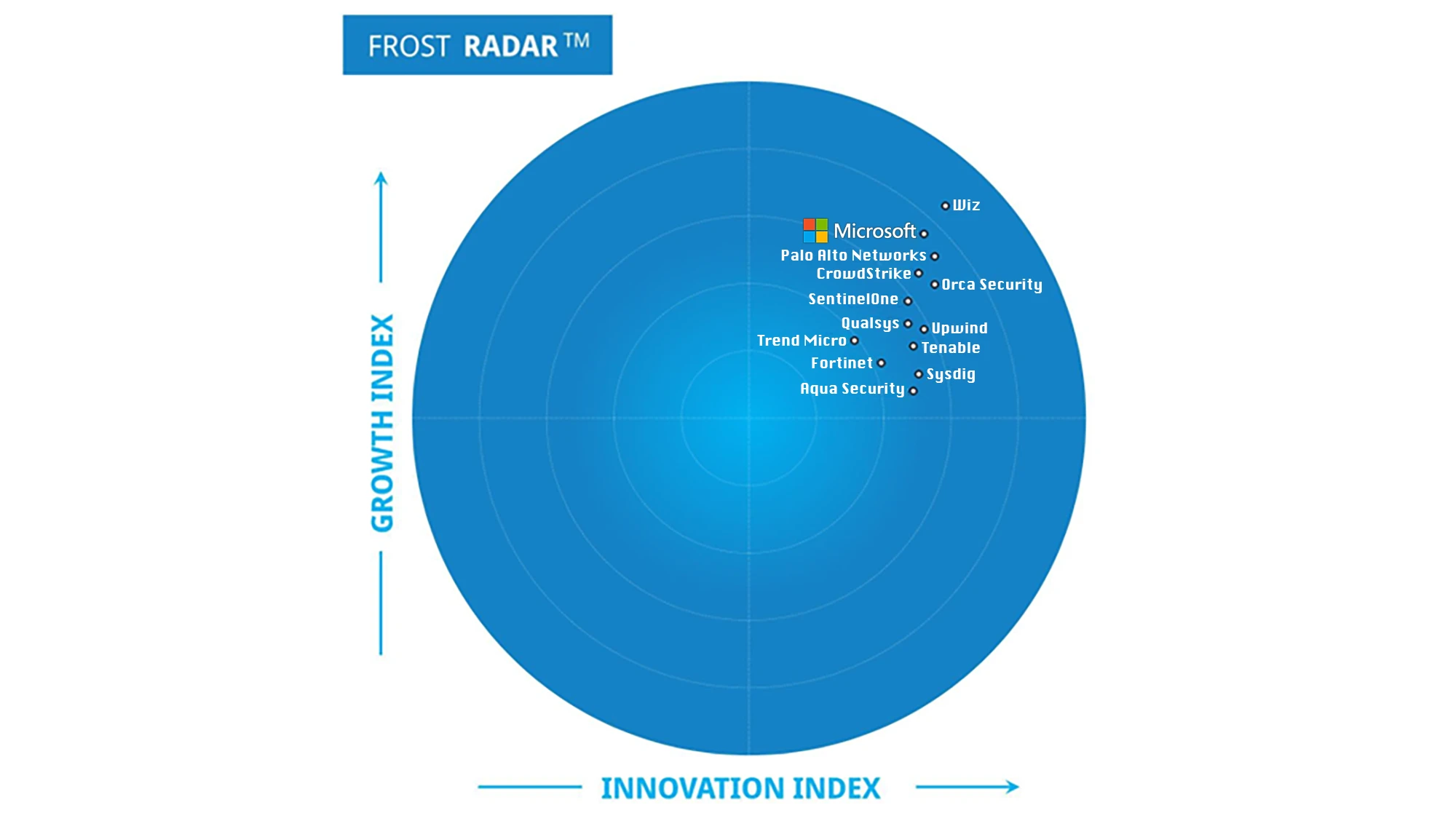
  29. 5 insights from Frost & Sullivan’s 2025 Frost Radar™ for Cloud Security Posture Management

    Frost & Sullivan’s 2025 Frost Radar for Cloud Security Posture Management forecasts that the CSPM market will grow from $2.82 billion to $6.96 billion by 2030 and places Microsoft among the leaders. It highlights a shift from periodic compliance to continuous, risk-based governance within CNAPP platforms, but is primarily market and positioning material rather than an actionable change for admins.

    30/100
  30. First look at the SharePoint API usage report

    A new SharePoint API Usage report is available in Microsoft Graph beta, showing how apps use SharePoint APIs in a tenant. It is disabled by default and must be enabled through the new report settings with the ReportSettings.ReadWrite.All permission, although the endpoints do not yet enforce the documented permissions and a global admin can enable it regardless.
    36/100
  31. A Deep Dive into Controlled Feature Rollout: Why Features are turned off by default

    Rudy Ooms examines Controlled Feature Rollout, the mechanism Microsoft uses to release new Windows features and hotfixes gradually and disabled by default. The post explains how an individual device determines when it receives a feature, helping admins understand why features appear at different times across their fleet.

    36/100
  32. KB – employeeLeaveDateTime show empty (null)
    When the employeeLeaveDateTime attribute appears as null in Entra ID, the usual cause is missing permissions because this sensitive attribute requires User-LifeCycleInfo.Read.All for access through Microsoft Graph. The value becomes visible after consent is granted, which is important for admins building lifecycle or offboarding automation around departure dates.

    29/100
  33. Why Windows is the hardest passkey surface in 2026 and what Entra admins should expect

    Data from large passkey deployments shows that Windows has the lowest sign-in success rate of any major platform in 2026, with Windows users struggling where iPhone users sign in seamlessly despite using the same identity provider and policy. Entra admins planning passkey deployments should expect their Windows fleet to generate the most support requests and pilot-test it especially thoroughly.

    39/100
  34. More robust external sharing controls now available for SPO/ODFB DLP policies

    Microsoft is rolling out two new DLP actions for SharePoint Online and OneDrive that can block access by external domains and users or move files to a quarantine location. The feature (MC1338823, roadmap 557191) remains in preview and appears only when a policy is scoped to SharePoint or OneDrive, giving IT admins more precise control over external sharing directly in SPO/ODFB DLP policies.

    47/100